You built the website. You wrote the pages. You waited weeks or months and still nothing. Google either ignores you completely or buries you on page four, where almost no one clicks.
This is one of the most common frustrations we hear at Prime Flow Digital. The good news is that the cause is almost never mysterious or random. In the vast majority of cases, the problem falls into a short list of specific, fixable issues. We run the same diagnostic sequence on every client site we audit, and the same patterns appear again and again.
This guide walks you through that exact sequence. We start with the issues that block everything else, then move to content, technical performance, and authority. For each reason, you will get clear symptoms, a free way to check it yourself, and the precise fix.
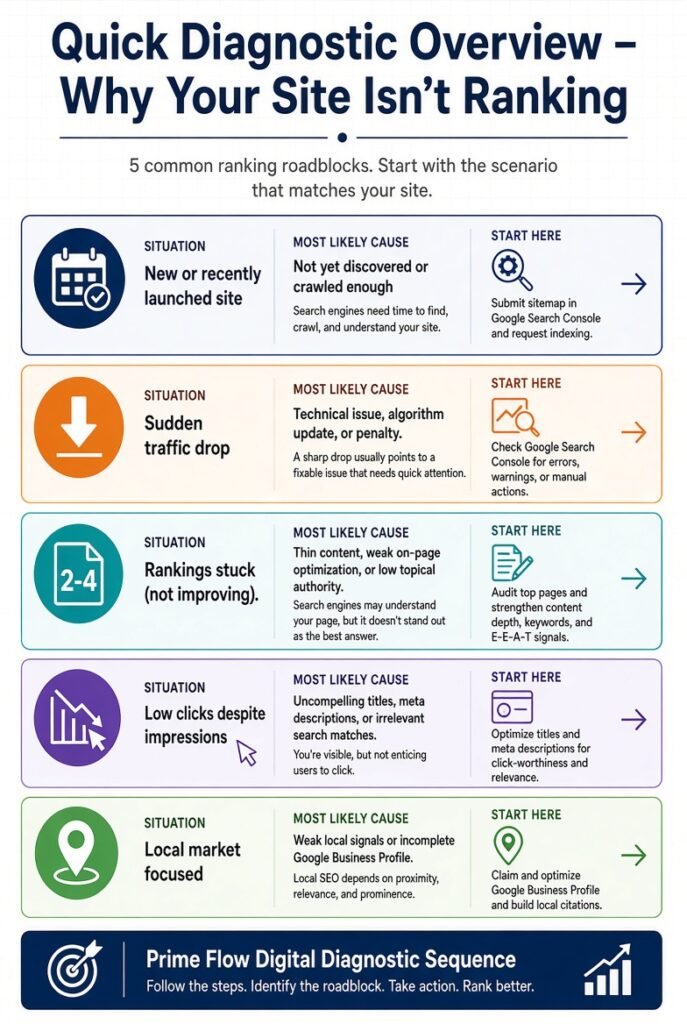
Quick Diagnostic Overview
| Your Situation | Most Likely Cause | Start Here |
| Brand-new site, never ranked | New domain + indexing | Reasons 1–3 |
| The site used to rank; traffic dropped. | Algorithm, content, or technical | Reasons 5, 9, and 15 |
| Ranking on page 2–4 but stuck | Intent, depth, or authority | Reasons 5–8, 13–15 |
| Ranking but almost no clicks | SERP features or AI Overviews | Reason 15 |
| Local businesses invisible on Maps | Local signals + indexing | Reasons: 1 + local |
Work through the list in order. Fixing later problems while earlier ones remain broken wastes time.
Group 1: Indexing & Crawlability (Fix These First)
If Google cannot find or store your pages, nothing else matters. These four issues account for a large share of “my site is invisible” cases.
-
Your pages are not indexed at all.
Symptoms: Searching the site yourdomain.com returns zero or almost no results. Searching the exact title of a page in quotes also fails.
How to check:
- Type your domain, yourdomain.com, into Google.
- Open Google Search Console → Pages report (or Coverage). Look at the “Not indexed” reasons.
- Use the URL Inspection tool on your most important pages.
Fix: Submit your XML sitemap in Google Search Console. Request indexing for your top 10–20 pages via URL Inspection. New sites often need 2–8 weeks for the first full crawl. Make sure your hosting and CMS are not blocking bots.
-
Robots.txt is blocking Googlebot.
Symptoms: Search Console shows “Blocked by robots. txt.” The site: search returns nothing even though the site loads fine for humans.
How to check: Visit yourdomain.com/robots. txt. Look for a line that says ‘Disallow:’ or ‘blocks important folders’.
Fix: Change it to allow crawling of the pages you want ranked. A safe starting point is:
text
User-agent: *
Allow: /
Sitemap: https://yourdomain.com/sitemap.xml
Test the change with the robots.txt tester inside Search Console.
-
Accidental noindex tag
Symptoms: The page loads publicly but never appears in search. Search Console reports “Excluded by ‘noindex’ tag.”
How to check: View the page source (Ctrl+U or Cmd+U) and search for “noindex”. On WordPress, also check Settings → Reading for the “Discourage search engines from indexing this site” checkbox—the single most common cause we still see on newly launched sites.
Fix: Remove the meta tag or uncheck the setting. Request re-indexing afterward.
-
Crawl budget wasted on low-value or duplicate URLs
Symptoms: Googlebot crawls thousands of parameter or filtered URLs, while your important pages get visited rarely. Common on e-commerce and large sites.
How to check: Look at Crawl Stats in Search Console and run a crawl with Screaming Frog (free up to 500 URLs).
Fix: Block unnecessary parameters in robots.txt, set proper canonical tags, and consolidate duplicate content. Clean architecture helps Google focus on the pages that actually matter.
Group 2: Content Quality & Search Intent
Once Google can crawl and index you, content decides whether you rank on page one or page eight.
-
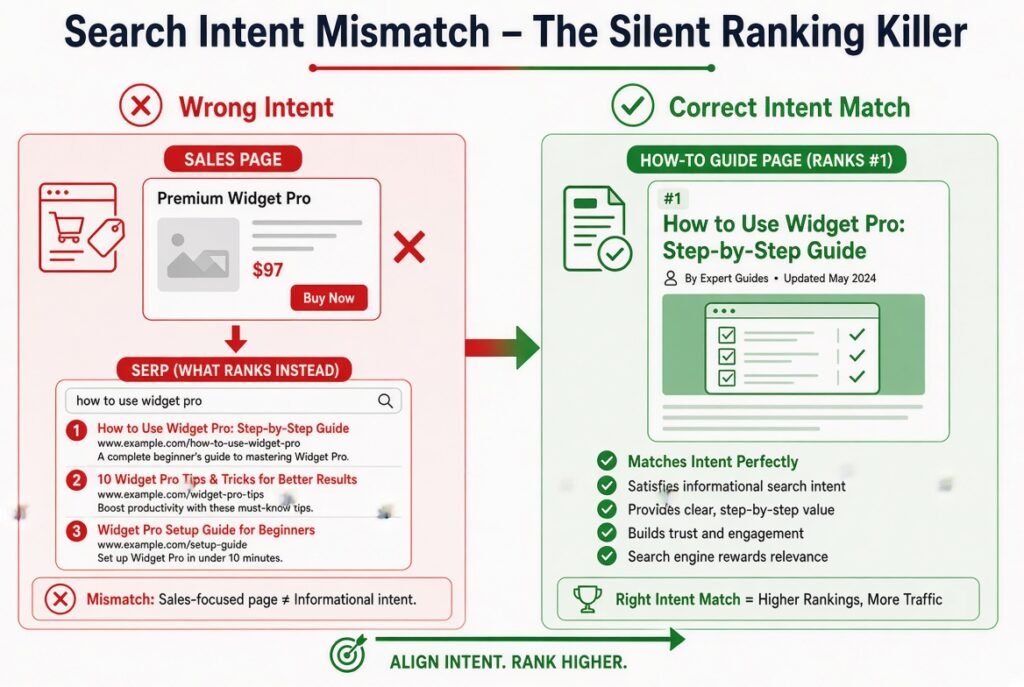
Content does not match search intent
Symptoms: Your page ranks poorly or not at all for a keyword even though it contains the words. The top results look completely different from your page (guides vs product pages vs comparisons).
How to check: Search your target keyword in an incognito window. Study the top 8–10 results. Note the dominant format and the questions they answer.
Fix: Match the format Google has decided to satisfy the query. If the SERP is full of how-to guides, a sales page will struggle. Rewrite or restructure so your page fulfils the same job better than the current winners.
-
Thin or low-value content
Symptoms: Your page has a few hundred words, while competitors ranking on page one have comprehensive coverage. The page feels like a surface-level rehash.
How to check: Compare word count, depth, and uniqueness against the top three results. Ask honestly: does your page add original insight, examples, data, or experience that the others lack?
Fix: Expand to fully answer the query and every related sub-question. For informational topics aim for thorough coverage (often 1,200–2,500 words). Add first-hand experience, proprietary data, clear examples, and original analysis. Google’s systems now detect and demote thin or purely generative content that does not help users.
-
Primary keyword missing from critical locations
Symptoms: The page targets a clear keyword, but the title tag, H1, and opening paragraph never use it naturally.
How to check: View the source or use any free on-page checker. Confirm the primary keyword appears in the title (near the front), H1, first 100 words, at least one H2, URL slug, and meta description.
Fix: Place it once cleanly in each of those locations. Do not stuff.
-
No topical authority or content clusters
Symptoms: You have one isolated page on a topic, and it ranks poorly, while competitors with interconnected clusters dominate.
How to check: Look at how many related pages you have on the same broader topic and whether they link to each other.
Fix: Build a simple hub-and-spoke structure. Create one strong pillar page and support it with 8–15 related articles that link back to the pillar and to each other. Google reads this internal linking as evidence of expertise.
Group 3: Technical Performance & User Experience
-
Poor Core Web Vitals / slow page speed
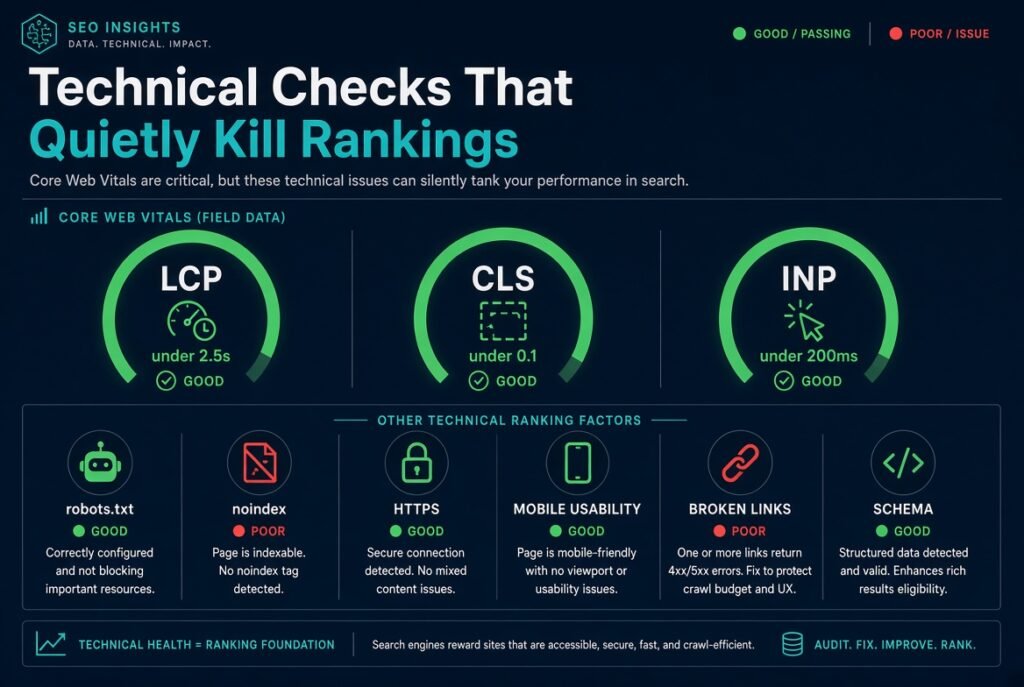
Symptoms: PageSpeed Insights shows Largest Contentful Paint (LCP) above 2.5 seconds, Cumulative Layout Shift (CLS) above 0.1, or Interaction to Next Paint (INP) above 200 ms. Search Console’s Core Web Vitals report flags URLs as “Poor”.
How to check: Run your homepage and top pages through pagespeed.web.dev (mobile and desktop).
Fix: Compress and convert images to modern formats (WebP/AVIF), lazy-load below-the-fold media, defer non-critical JavaScript, enable caching, and use a quality host or CDN. Most WordPress sites reach “Good” scores with the right combination of caching, image optimisation, and clean code.
-
Mobile usability problems
Symptoms: Text too small, buttons too close together, horizontal scrolling, or intrusive interstitials on mobile. Google uses mobile-first indexing—the mobile version is the one that ranks.
How to check: Use Chrome DevTools device emulator and Search Console’s mobile usability signals where available.
Fix: Ensure responsive design, minimum 16 px body text, 48×48 px tap targets, and no aggressive pop-ups in the first few seconds on mobile.
-
On-page SEO gaps
Symptoms: Missing or weak title tags and meta descriptions, poor heading hierarchy, weak internal linking, or keyword cannibalisation (multiple pages fighting for the same term).
How to check: Crawl the site and review titles, metas, H1/H2 structure, and internal links pointing to each important page.
Fix: Write unique, compelling titles and descriptions. Use a clear heading structure. Give every important page at least three to five internal links with descriptive anchor text. Consolidate or re-angle competing pages.
-
Other technical errors
Broken links, redirect chains, missing or broken schema, HTTP/HTTPS mixed content, and incorrect canonicals all quietly hold pages back.
How to check: Screaming Frog or a similar crawler, plus Search Console and the browser console for mixed-content warnings.
Fix: Clean them systematically. HTTPS has been a ranking signal for years; mixed content still causes problems.
Group 4: Authority & Competitive Reality
-
Weak backlink profile or low domain authority
Symptoms: Your content matches intent, and the technical side is clean, yet you remain stuck behind sites with stronger link profiles.
How to check: Use any reputable backlink tool to compare referring domains and authority metrics against the pages ranking above you.
Fix: Earn links through original research, useful tools, expert commentary, genuine outreach, and high-quality content that people naturally want to reference. Avoid shortcuts—they create more problems than they solve.
-
Weak E-E-A-T signals
Google looks for clear evidence of experience, expertise, authoritativeness, and trustworthiness. Anonymous content or pages with no verifiable author, about information, or proof of real-world experience struggle.
Fix: Add clear author bios with credentials and an About page that shows real people and experience, case studies, original data, and transparent contact information.
-
Competitors are simply stronger, or SERP features are taking the clicks.
Sometimes the top results are objectively better, or an AI overview, featured snippet, or local pack sits above your ranking and captures the traffic.
How to check: In Search Console, look at impressions versus clicks. High impressions with low clicks often means a feature is intercepting traffic. Compare content depth and authority against the actual ranking pages.
Fix: Outperform them on a narrower sub-topic first, strengthen your own page, and work to become the source that AI systems and featured snippets prefer to cite. The same helpful, entity-rich, experience-backed content that ranks well on Google is what modern answer engines prefer.
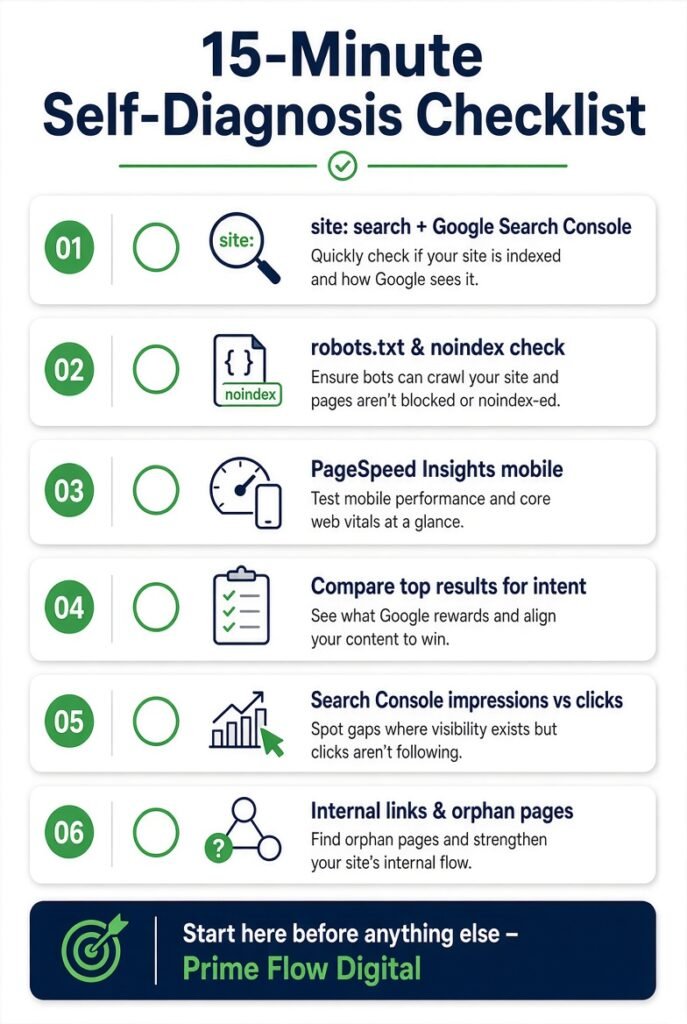
15-Minute Self-Diagnosis Checklist
- Search site: yourdomain.com and inspect key pages in Google Search Console.
- Check robots.txt and look for noindex tags.
- Run PageSpeed Insights on mobile for your top pages.
- Google your main target keywords and compare format and depth with the top results.
- Review Search Console Performance for impressions, clicks, and average position trends.
- Confirm important pages have internal links and are not orphaned.
If the page is indexed, technically clean, intent-matched, and still not moving, the issue is almost always content depth or authority—both of which take consistent work.
How Long Does Improvement Take?
Most sites that systematically fix the issues above begin to see meaningful movement in three to six months. New domains and competitive topics take longer. Rankings rarely jump overnight; they climb in steps. Consistency beats one-time heroics.
When to Get Expert Help
You can resolve many of the technical and on-page issues yourself with the free tools listed above. Where most businesses get stuck is distinguishing “keep going, it is still climbing” from “something is actually wrong,” or executing the deeper content and authority work at scale.
At Prime Flow Digital we run this exact diagnostic on every engagement. We identify the highest-impact issues first, fix the blockers, and then build the content and authority layers that produce lasting rankings and visibility in AI answer engines as well.
If you have worked through the checklist and are still not seeing progress, or if you simply want a clearly prioritised action plan, reach out for a ranking diagnosis. We will tell you exactly what is holding the site back and what to fix first.
Frequently Asked Questions
Why is my website not showing up on Google at all?
Most often the pages are not indexed because of robots.txt or noindex tags, or the site is too new and has not been fully crawled yet. Start with the indexing checks above.
How do I check if Google has indexed my site?
Use the site:yourdomain.com search and the Pages report plus the URL Inspection tool inside Google Search Console.
How long does it take for a new website to rank?
Expect several months of consistent work. Early wins usually come from lower-competition, long-tail, or local terms, while authority builds.
Does page speed really affect rankings in 2026?
Yes. Core Web Vitals remain ranking signals, and slow pages also hurt user experience and conversion rates.
Can I fix ranking issues myself?
Many technical and on-page problems can be fixed with free tools. Deeper content strategy, topical authority, and link acquisition often move faster with experienced help.
Why do competitors rank higher even with similar content?
They usually have stronger topical depth, better internal linking, more relevant backlinks, or clearer E-E-A-T signals. Matching or exceeding those signals is the path forward.
A website that does not rank is a missed opportunity for traffic, leads, and revenue. The issues that keep most sites invisible are identifiable and fixable. Start with indexing, match search intent with genuinely helpful content, clean up the technical foundation, and steadily build authority