You can spend months and a healthy budget on a beautiful new website, then watch it sit on page seven of Google. It happens far more often than most agencies like to admit, and the cause is almost always the same: SEO was treated as a finishing touch instead of part of the build.
The good news is that building search visibility in from day one is cheaper and faster than fixing problems after launch. The structure, speed, content and technical set-up that help a site rank are decisions you make during planning and development, not extras you sprinkle on at the end.
This guide walks through the whole process in ten practical steps, from keyword research to post-launch monitoring. It is written for UK business owners, founders and marketing managers who are planning a new website or a rebuild, and for anyone who needs to brief a developer on what ‘SEO-friendly’ really means.
What makes a website SEO-friendly?
An SEO-friendly website is one that search engines can easily crawl, understand and trust, and that people find fast, secure and simple to use on any device. In practice, that means a logical structure, clean code, quick-loading pages, mobile-first design, genuinely helpful content and the technical basics set up properly before launch.
None of that is mysterious. Google’s job is to send people to the pages that answer their question best, so a site that is easy to navigate, quick to load and clearly about something tends to do well.
Why build SEO in from the start?
When a new website is being planned, the conversation is usually about colours, logos, fonts and photography. SEO is often the team that never gets invited to the room. Then launch day arrives, traffic does not appear on its own, and the business pays again to fix what could have been built correctly the first time.
There is also a skills gap to be aware of. Many designers and developers are excellent at what they do but are not trained in SEO, so a site can look superb while quietly working against how search engines crawl and understand it.
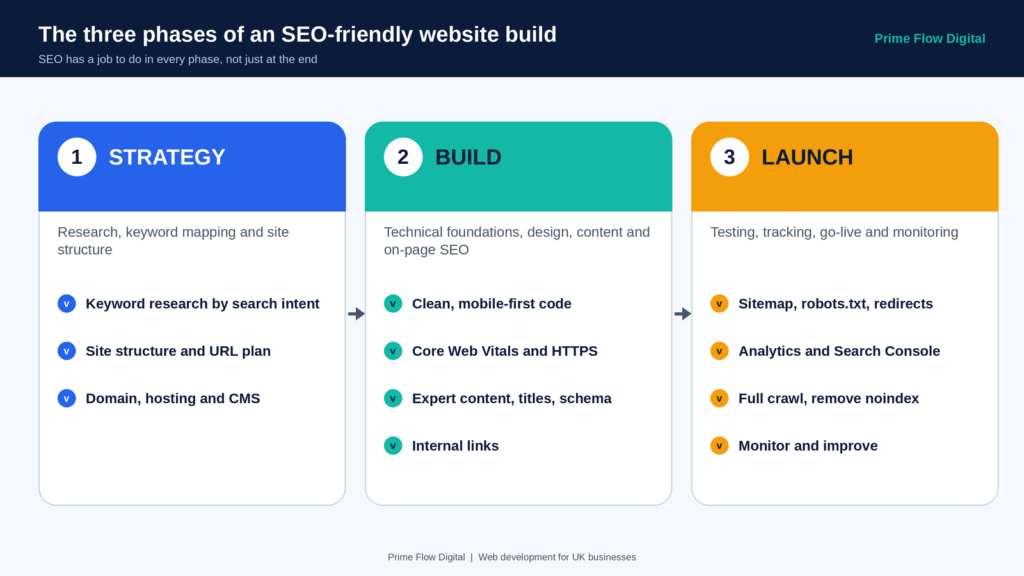
A helpful way to think about the project is as three connected phases:
- Strategy: research, keyword mapping and site structure
- Build: technical foundations, design, content and on-page optimisation
- Launch: testing, tracking, go-live and monitoring
SEO has a job to do in every one of them.
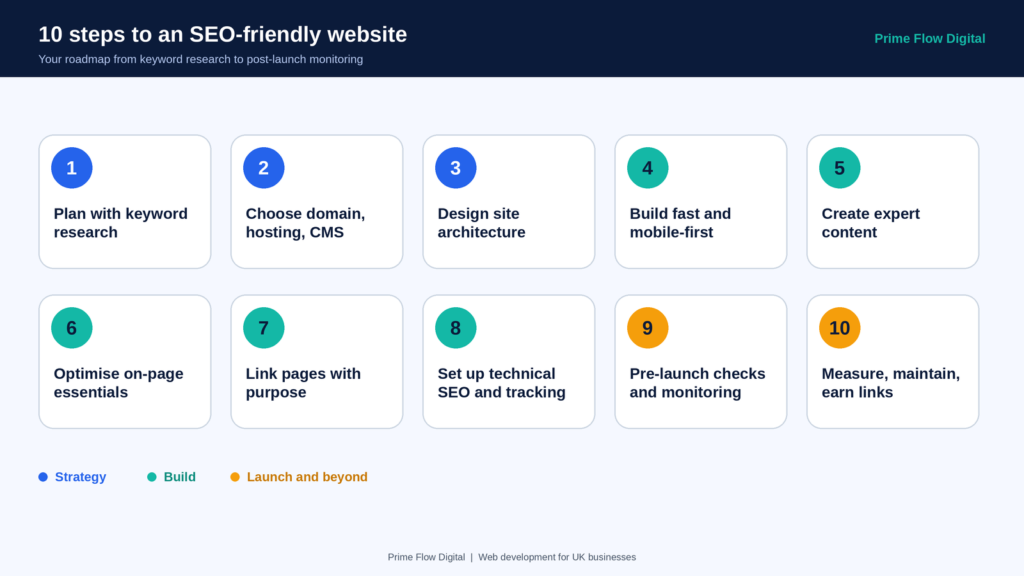
Step 1: Plan with keyword research and search intent.
Keyword research tells you how your customers actually describe what you offer, and that shapes your navigation, page topics and content before a single page is designed.
Start with a seed list by asking a few simple questions:
- What are the main topics our website needs to be found for?
- What would we type into Google if we were looking for what we sell?
- How do our customers describe their problem in their own words?
- What problems do our products or services solve, and what would someone search for when they have them?
Then refine the list with proper tools. Google Keyword Planner and Google Search Console are free starting points, and platforms such as Semrush, Ahrefs, Moz and SE Ranking add volume, difficulty and competitor data.
Two habits make this research far more useful:
- Group keywords by search intent. Some searches are informational (‘how do I…’), some are navigational (looking for a specific brand), some are commercial (comparing options) and some are transactional (ready to buy or enquire). Aim for one page per intent rather than forcing a single page to serve all of them.
- Study the top five results. They show you the format Google currently rewards, whether that is a long guide, a comparison or a list, and how deep your content needs to go. The People Also Ask box and related searches are a free source of questions to answer.
For example, a physiotherapy clinic in Leeds would not target ‘physio’ on its own. It would map separate pages to terms such as ‘sports injury physiotherapy Leeds’ and ‘back pain treatment Leeds’, each matched to what that searcher wants.
Step 2: Choose your foundations: domain, hosting and CMS.
Three early decisions quietly influence everything that follows.
Domain. Your site should live on one canonical domain, with every other variation redirecting to it using a 301 redirect. It is easy to end up with several versions without realising: the .com and the .co.uk, with and without www, on HTTP and on HTTPS. Combine those, and you can have eight versions of one site competing with themselves. For UK businesses, a .co.uk domain is the natural choice for a UK audience, and a brand-led name beats one stuffed with keywords.
Hosting. Cheap, slow hosting is a false economy. It creates a poor experience for visitors and makes it harder for search engines to crawl your site efficiently. Choose a reliable host with strong uptime, ideally with servers close to your audience, and make sure the setup suits your platform.
CMS or platform. WordPress, Webflow and Wix are all widely used, and common platforms are generally easy for search engines to understand. Pick the one that fits your requirements, your team’s skills and how much control you need over technical SEO, rather than simply the one your agency happens to prefer. Check that you can edit title tags, meta descriptions, canonical tags, redirects and structured data without needing a developer every time.
Step 3: Design your site architecture, URLs and navigation
Site structure is where SEO and usability meet. A clear hierarchy helps visitors find what they need and helps search engines understand how your pages relate to one another.
A useful way to picture it is a filing cabinet. The website is the cabinet, the main categories are the drawers, subcategories are the folders and individual pages are the documents. If someone opens the ‘Services’ drawer, everything inside is understood to be a service before a word is read.
A typical structure looks like this:
- Home
- Services
- SEO
- SEO audits
That maps neatly to a readable URL path: /services/seo/audits/. Compare that with something like /s123/s1/75/, which tells neither people nor search engines anything.
A few rules of thumb:
- Keep it shallow. Most content should be reachable within three or four clicks from the homepage, and your most important pages should be even closer.
- Use descriptive, readable URLs. Short, lowercase, hyphenated and relevant to the page topic.
- Keep navigation simple and text-based. Label menu items clearly and avoid mega menus crammed with links. If a visitor has to think about where to click, you are losing them.
- Plan topic clusters. Group related content under a main pillar page and link the supporting pages to it and to each other. This builds topical authority and avoids pages competing for the same keyword.
Step 4: Build it fast, clean and mobile-first.
This is where your developer’s decisions have the biggest impact on SEO.
Write clean, semantic code. Use proper HTML5 elements such as header, nav, main, article and footer, and a sensible heading structure. Keep scripts and dependencies lean so pages stay fast and are easy for search engines to process.
Design mobile-first. Google primarily uses the mobile version of your site for indexing and ranking, so the mobile experience must contain your full content and functionality, not a stripped-back version. Make text readable (body copy of at least 16px is a sensible baseline), keep tap targets easy to hit and avoid intrusive pop-ups.
Meet the Core Web Vitals. These are Google’s measures of real-world page experience:
| Metric | What it measures | Good score |
| Largest Contentful Paint (LCP) | How quickly the main content loads | Under 2.5 seconds |
| Interaction to Next Paint (INP) | How quickly the page responds to taps and clicks | Under 200 milliseconds |
| Cumulative Layout Shift (CLS) | How much the layout jumps around while loading | Under 0.1 |
People are impatient: most will abandon a page that takes more than a few seconds to appear. To keep pages quick, compress images and use modern formats such as WebP or AVIF, lazy-load images below the fold, minify CSS and JavaScript, use browser caching and consider a content delivery network. Test regularly with Google’s PageSpeed Insights.
Secure the site with HTTPS. An SSL certificate protects data passing between your site and visitors, builds trust and is a light ranking signal. It should be standard on every new site.
Be careful with JavaScript. Modern search engines can render JavaScript, but heavy client-side rendering can still cause problems. Where possible, use server-side rendering or static generation so key content is available straight away.
Step 5: Create content that shows experience and expertise.
Content is the backbone of SEO, and Google’s guidance consistently rewards pages written for people first. The framework to keep in mind is E-E-A-T: Experience, Expertise, Authoritativeness and Trustworthiness.
In practice, that means:
- Show who is behind the content. Use named authors with real credentials and a short bio.
- Be genuinely useful. Answer the question better than the pages already ranking, with specific examples, practical detail and original insight where you have it.
- Cover one topic per page. A page that covers a single subject thoroughly usually beats one that skims four.
- Cite your sources. Link to primary sources and keep facts, figures and legal details accurate and up to date.
- Match content to the buyer’s journey. Blog posts and guides help people who are just learning about a problem, case studies and service pages help those comparing options, and testimonials and clear contact routes help those ready to act.
As a rough guide, competitive informational queries often need around 1,000 to 2,500 words of substantial content, but length is never the goal. Depth, clarity and usefulness are. If you use AI tools to speed up drafting, treat the output as a first draft and edit it hard, adding real expertise and checking every fact. Unedited, mass-produced content is exactly what search engines are trying to filter out.
Step 6: Optimise the on-page essentials
Once the structure and content are in place, polish each page.
- Title tags: around 50 to 60 characters, with the main keyword near the front and the brand at the end. Make each one unique and written to earn the click, not just to include keywords.
- Meta descriptions: roughly 120 to 155 characters. They do not directly affect rankings, but a clear, honest description with a reason to click can lift click-through rates.
- Headings: one H1 per page, followed by H2s and H3s in a logical order. Make sure the H1 is the most prominent heading visually.
- Images: use descriptive file names, meaningful alt text, the right dimensions and compressed file sizes. Describe what the image shows rather than stuffing in keywords.
- Structured data: add schema markup in JSON-LD format so search engines understand the page and can show richer results. Common types include Article, FAQPage, BreadcrumbList, Organization and LocalBusiness.
- Canonical tags: use them correctly to point to the preferred version of each page, and never generate them blindly from whatever URL is in the address bar.
- Open Graph and social tags: so links look right when shared.
Write naturally throughout. Keyword density is a myth, and forced repetition makes copy harder to read without helping rankings.
Step 7: Link your pages together with purpose
Internal links help search engines discover pages, understand their relationships and distribute authority across the site. They also guide visitors to the next helpful step.
- Link between related pages using descriptive anchor text rather than ‘click here’.
- Make sure every important page is linked from several other pages, so none is left orphaned.
- Use breadcrumb navigation with structured data to show where a page sits in the hierarchy.
- Link from supporting articles up to your main service pages, and from service pages across to relevant case studies.
Step 8: Set up technical SEO and tracking before launch
The technical layer is easy to forget in the rush towards go-live, so build it into your plan.
- XML sitemap: lists the pages you want indexed. Submit it in Google Search Console and Bing Webmaster Tools.
- robots.txt: tells crawlers which areas to avoid. Check it carefully, because a single wrong line can block your whole site.
- Redirects: if you are replacing an existing site, map every old URL to its new equivalent with 301 redirects so you keep the rankings and links you have already earned.
- Analytics: set up Google Analytics 4 (or a privacy-friendly alternative) and Google Search Console from day one, so you have a baseline to measure against. If you use cookies for analytics, make sure your consent set-up complies with UK GDPR and PECR rules.
- Error handling: create a helpful custom 404 page and make sure broken links are fixed rather than ignored.
Step 9: Run a pre-launch checklist, then monitor the launch
Before going live, crawl the whole site with a tool such as Screaming Frog or Sitebulb. Look for broken links, missing titles and descriptions, redirect chains, duplicate content and pages blocked from indexing.
One mistake worth checking for specifically: staging sites are often set to ‘noindex’ to keep them out of search results, and that setting sometimes survives into the live site. If it does, your new website will be invisible to Google. Confirm it has been removed.
After launch, watch closely. Use Search Console to monitor indexing and crawl errors, check that redirects work as planned and compare your early traffic with your baseline. It can take days or weeks for a new site to be fully indexed, so be patient, but investigate anything that looks wrong.
Step 10: Measure, maintain and earn links after launch
Launch is the start of SEO, not the end. Search results change, competitors improve and Google updates how it ranks pages, so ongoing attention matters.
As a rough guide, a new site can show early signals within three to six months and meaningful traffic from competitive terms within six to twelve, although this varies widely by industry and competition.
To keep momentum:
- Publish and refresh content regularly, especially pages with dates, prices, statistics or regulations.
- Review Search Console to see which queries bring impressions and which pages could earn more clicks.
- Earn quality backlinks by creating genuinely useful resources, sharing your expertise and building relationships with relevant, reputable sites. Quality matters far more than quantity.
- Keep an eye on the evolving search landscape, including AI-generated answers. Clear structure, strong authority and well-implemented structured data all help your content get understood and cited.
Common mistakes that hurt new websites
- Treating SEO as an afterthought, and only involving specialists once the design is signed off
- Duplicate content, including multiple domain, subdomain and protocol versions of the same page
- Keyword cannibalisation, where several pages target the same term and compete with each other
- Incorrect canonical tags that make duplication worse instead of fixing it
- Orphaned pages that nothing links to, or content only reachable through the site’s own search box
- Important text locked inside images, which search engines and screen readers cannot properly read
- Slow, heavy pages caused by oversized images, bloated themes and too many scripts
- Forgetting mobile, despite most visitors arriving on a phone
- Launching without tracking, leaving no baseline to measure against
Your SEO-friendly website checklist
| Phase | Task | Done |
| Strategy | Keyword research grouped by search intent | [ yes] |
| Strategy | Site structure and URL plan mapped to keywords | [yes ] |
| Strategy | One canonical domain, hosting and CMS chosen | [yes ] |
| Build | Clean, semantic HTML and mobile-first design | [yes ] |
| Build | Core Web Vitals within target (LCP, INP, CLS) | [yes ] |
| Build | HTTPS enabled across the whole site | [ yes] |
| Build | Helpful, expert content with named authors | [ yes] |
| Build | Unique titles, meta descriptions and heading structure | [yes ] |
| Build | Image alt text, schema markup and canonical tags | [yes ] |
| Build | Internal links and breadcrumb navigation | [yes ] |
| Launch | XML sitemap and robots.txt checked | [yes ] |
| Launch | 301 redirects mapped for any old URLs | [yes ] |
| Launch | Analytics and Search Console configured | [yes ] |
| Launch | Full crawl completed, noindex tags removed | [ yes] |
| After launch | Indexing, errors and rankings monitored | [yes ] |
| After launch | Content refreshed and backlinks earned | [yes ] |
How Prime Flow Digital builds SEO-friendly websites for UK businesses
At Prime Flow Digital, we build websites for UK businesses, and we treat search visibility as part of the brief from the very first conversation, not a service added once the design is finished. That means agreeing keywords and site structure early, building on clean, fast foundations and setting up tracking before launch, so you can see what your new site is actually doing.
If you are planning a new website or a rebuild and want it to be found as well as admired, get in touch with Prime Flow Digital and we will talk you through the options.
Final thoughts
An SEO-friendly website is not built by adding a plugin at the end. It is the result of good decisions made at every stage: researching what people search for, structuring the site logically, building it fast and clean, writing genuinely helpful content and launching with the right technical and tracking foundations in place.
Get those right from the ground up, and your website has a far better chance of being found, trusted and chosen.
Ready to build a website that works as hard as it looks? Talk to Prime Flow Digital about an SEO-first build for your business.
Frequently asked questions
What makes a website SEO-friendly?
An SEO-friendly website is fast, secure, mobile-friendly and clearly structured, with helpful content and clean technical foundations. Search engines can crawl and understand it easily, and visitors can find what they need quickly, which is what Google ultimately wants to reward.
How long does it take for a new website to rank on Google?
It depends on competition and your starting point, but early signals often appear within three to six months, and meaningful traffic from competitive searches commonly takes six to twelve. Strong planning before launch can shorten the journey.
Should SEO be done before or after building a website?
Both, but the foundations should come first. Keyword research, site structure, speed and technical set-up are far easier and cheaper to get right during the build than to fix afterwards. Ongoing optimisation then continues after launch.
Which CMS is best for SEO?
There is no single winner. WordPress, Webflow and other established platforms can all rank well when set up properly. Choose one that lets you control titles, meta descriptions, redirects, canonical tags and structured data, and that fits your team’s skills.
Does website speed affect SEO?
Yes. Page experience, including Core Web Vitals, is part of how Google assesses pages, and slow sites also lose visitors who leave before the page loads. Aim for an LCP under 2.5 seconds, INP under 200 milliseconds and CLS under 0.1.
How many pages does a new website need to rank?
There is no magic number. A focused five-page site can rank for a narrow local service, while a broader business needs more pages to cover each service, location and question properly. Quality and relevance matter more than volume.
Is it better to rebuild or fix an existing website for SEO?
If the structure, platform or speed problems are deep, a rebuild may be the cleaner option. If the foundations are sound, targeted fixes are often enough. Either way, audit first and protect existing rankings with proper 301 redirects.
Do I need schema markup on a new website?
It is not essential, but it is strongly recommended. Schema markup helps search engines understand your pages and can unlock richer search results, so adding it during the build is easier than retrofitting it later.