You spent a whole afternoon writing a blog post. You researched it, edited it, found the right image and published it. It got a handful of visits in the first week, and then it slipped quietly down your blog archive, never to be seen again.
If that sounds familiar, you are not alone. Most UK small businesses put real effort into a blog and then use each post exactly once. The good news is that a single well-written post can do far more work than that. You can turn one blog post into multiple pieces of SEO content, such as a LinkedIn carousel, an email, a short video and a set of FAQ answers, without starting from scratch each time.
At Prime Flow Digital, we build websites for UK businesses, and we see the same pattern again and again. The website is the hub, the blog is the engine, and the businesses that grow fastest are the ones that spread what they publish across more than one channel. In this guide, we will show you a practical workflow that a small team or even a single owner-manager can run in about a week.
What Is Content Repurposing?
Content repurposing is the practice of taking a piece of content you have already created, such as a blog post, and reshaping it into new formats for different audiences and platforms. You keep the core idea and the research, but you change how it is presented, so it works as a video, a graphic, an email or a social post.
Repurposing vs Cross-Posting vs Reposting
These three terms are often mixed up, but they are not the same thing:
- Cross-posting means sharing the same content, unchanged, on several channels.
- Reposting means sharing the same content again later.
- Repurposing means rebuilding the idea so it suits the format and the audience of each channel.
Repurposing takes a little more effort, but it performs better, because each version feels native to where people find it. A LinkedIn carousel should read like a LinkedIn carousel, not like a pasted paragraph from your website.
Is It Safe to Reuse Your Own Content?
Yes. You own the content you create, so you are free to reuse, adapt and republish your own work. The rule to remember is simple: never repurpose content written by someone else without permission. Turning a competitor’s article into a video or an infographic is copying, not repurposing.
Why Repurposing Helps Your SEO
Repurposing is often described as a time saver, and it is. But for a business that wants to be found online, the bigger benefit is what it does for your search visibility.
It builds topical authority. Search engines look for websites that cover a subject thoroughly. When you publish one topic as a blog post, a video, a set of social posts and an email series, you show depth on that subject, not just a single page about it.
It gives you more ways to be found. A video can appear in video results. An infographic can appear in image results. A clear FAQ answer can be picked up as a featured snippet or quoted in an AI-generated answer. One post becomes several chances to show up.
It attracts links and brand mentions. A guest post, a helpful community answer or a shareable graphic can lead people back to your website, and some will link to it. Links and mentions from relevant places help build trust in your site over time.
It keeps people on your page longer. If you embed a short video or an infographic in your original post, visitors have more reason to stay and engage with it.
It stretches your return on effort. Instead of writing a new post every time you need something to say, you start from a finished piece that you already know is accurate and useful.
Step 1: Choose the Right Blog Post
Not every post is worth repurposing. Start with the ones that have already proved themselves. Ask yourself these questions:
- Which posts bring the most visits? Check Google Search Console and Google Analytics for the pages with the most organic traffic, time on page or enquiries.
- Which posts are evergreen? Guides, how-tos and explainers stay useful for months or years. A post about a one-off news event does not.
- Which posts contain useful data or a clear process? Statistics, step-by-step lists and comparisons are easy to split into smaller pieces.
- Which posts could be improved with a refresh? If a post performs well but has an outdated example or statistic, update it before you repurpose it.
A simple way to decide is to give each candidate post a score out of five for traffic, usefulness, evergreen value and structure. Pick the highest scorer and start there.
Step 2: Prepare the Post So It Can Be Split
The easiest posts to repurpose are the ones written with repurposing in mind. Before you start creating new formats, check that your blog post has the following:
- Clear H2 and H3 headings. Each section should be able to stand on its own.
- A short definition near the top. Two or three sentences that answer the main question directly.
- One numbered process. A list of steps is perfect for carousels, checklists and videos.
- One comparison or table. Useful for social graphics and “X vs Y” searches.
- A short FAQ section. Every question and answer is a standalone piece of content.
- Two or three standout facts or quotes. These make strong social posts and graphics.
If your post is missing a few of these, add them. It improves the post for readers and for search engines, and it gives you more raw material.
This is also where your website matters. A well-built blog template makes repurposing simpler. A summary box at the top, a clean heading structure, FAQ markup, fast-loading pages and share images that display properly on social platforms all help your content travel further. If your current website makes any of that difficult, it is worth fixing, and it is something our team helps UK businesses with every day.
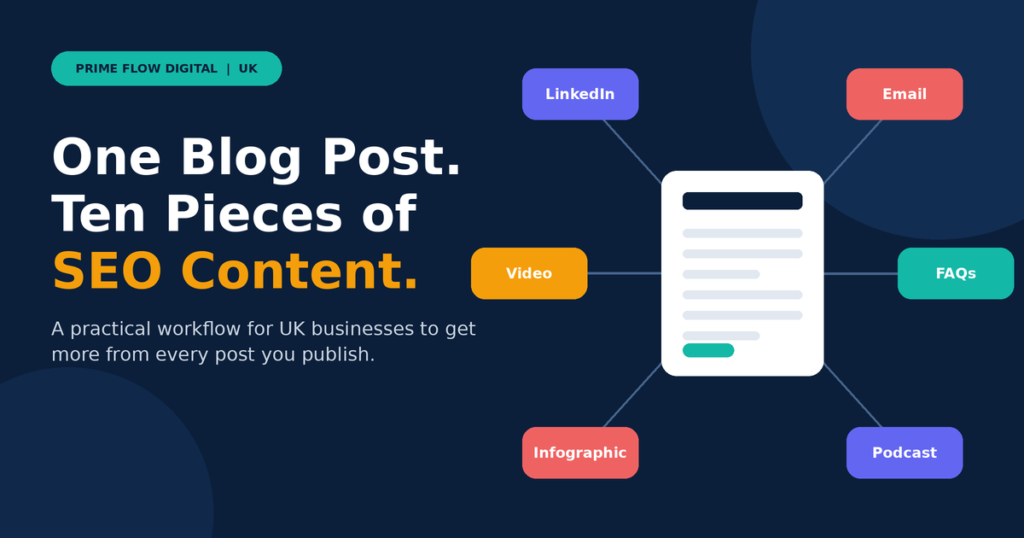
Step 3: Turn One Post Into 10 Pieces of Content
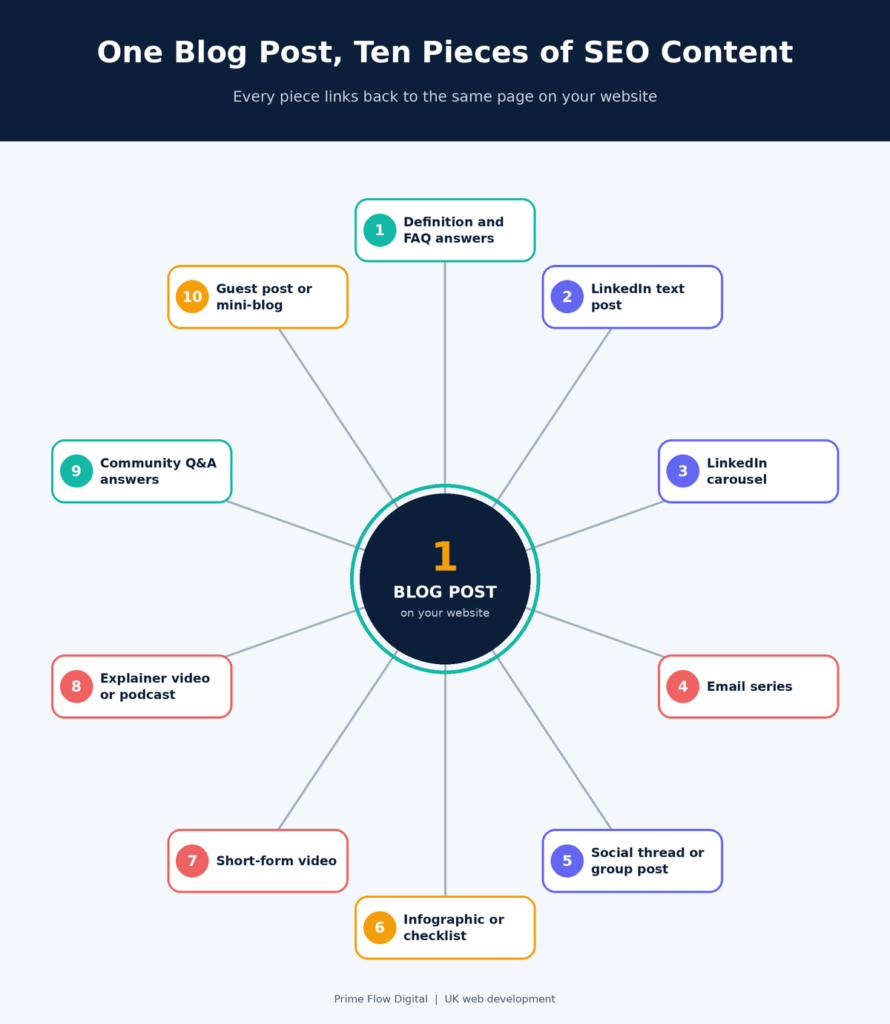
Here are ten pieces you can create from a single post. To make each one concrete, imagine a Manchester accountancy firm that has published a guide called “How to Prepare for Your Self Assessment Tax Return”. The examples below are hypothetical, but the method works for any industry.
1. Definition Snippet and FAQ Answers
Pull out the short definition and the answers from your FAQ section. Keep each answer to roughly 40 to 60 words, and make sure it answers the question directly in the first sentence.
Where to use it: Your own website (with FAQ markup), your Google Business Profile Q&A or updates, and as source text for your other pieces.
SEO benefit: Clear, direct answers are the kind of content that can appear in featured snippets and AI-generated answers.
Example: The accountancy firm turns “When is the Self Assessment deadline?” into a short, accurate answer that sits on the page and in a Google Business Profile post.
2. LinkedIn Text Post
Choose your strongest insight or framework and turn it into a short post. Start with a hook in the first line, use short paragraphs, and finish with a question or a link to the full article.
Where to use it: LinkedIn company page and your own profile.
SEO benefit: It sends relevant visitors to your site, and strong posts can earn shares and mentions.
3. LinkedIn Carousel
Take the numbered process from your post and turn each step into a slide. Keep the text short, use your brand colours, and add a final slide with your website address.
Where to use it: LinkedIn, and as a PDF you can host on your own site.
SEO benefit: Carousels keep people engaged and give you a visual asset that can be shared again and again.
Example: A six-slide carousel called “6 Records to Gather Before You File”.
4. Email Newsletter or Mini Series
Split the post into two or three short emails. Each one should cover a single idea, add a personal comment or a quick story, and link back to the full post.
Where to use it: Your email list.
SEO benefit: Email brings repeat visitors to your blog, and engaged readers are more likely to share and link to your content.
UK compliance note: If you send marketing emails, make sure you have a lawful basis, usually consent for individuals, and include a clear way to unsubscribe. Check the latest guidance from the ICO, as the rules under UK GDPR and PECR depend on who you are emailing.
5. Social Thread or Facebook Group Post
Break the post into a series of short posts for X, or write a helpful summary for a local Facebook group where it is welcome. Start with a hook, walk through the key points and close with a link to the full article.
Where to use it: X, Facebook pages and relevant local groups.
SEO benefit: More visibility for your brand and another route back to your website.
6. Infographic or Checklist
Turn your data, comparison or process into a single visual. A checklist works particularly well as a downloadable PDF that you can offer in exchange for an email address.
Where to use it: Your blog post, Pinterest, LinkedIn and your email list.
SEO benefit: Images can appear in image search, and a good visual is easy for others to share and credit.
Example: A one-page “Self Assessment Document Checklist” PDF.
7. Short-Form Video
Record a 30 to 90 second clip that explains one point from your post. You do not need studio equipment. A clear voice, good lighting and captions are enough.
Where to use it: YouTube Shorts, Instagram Reels, TikTok and LinkedIn.
SEO benefit: Video gives you another listing that can appear in search, and it introduces your brand to people who prefer watching to reading.
8. Longer Explainer Video or Podcast Talking Points
Use your post as a script for a five to ten minute walkthrough. You can record it on screen with a tool like Loom or talk through the main points as an audio episode. Embed the finished video in your original post.
Where to use it: YouTube, your blog post and podcast platforms.
SEO benefit: Embedded video can encourage visitors to stay on the page longer, and a YouTube listing can bring in new viewers.
9. Community and Q&A Answers
Search Quora, Reddit and relevant forums for questions related to your topic. Answer them properly, using what you wrote, and only add a link where it is useful and allowed by the community rules.
Where to use it: Quora, Reddit, industry forums and local groups.
SEO benefit: It builds your reputation and can bring qualified visitors, but only if you are genuinely helpful and not promotional.
10. Guest Post or Expanded Mini-Blog
Take one section of your post and expand it into a new article of about 500 words, then link it back to the original. Or pitch a fresh angle on the same research to a relevant publication in your industry.
Where to use it: Your own blog, industry websites and trade publications.
SEO benefit: A group of related articles linking to a main guide creates a topic cluster, which helps you rank for both the broad term and the more specific searches. Guest posts can also earn valuable links.
Bonus: a PDF content upgrade. Combine your checklist, slides or key points into a short PDF that readers can download in exchange for their email address. It turns a blog visitor into a lead you can follow up with.
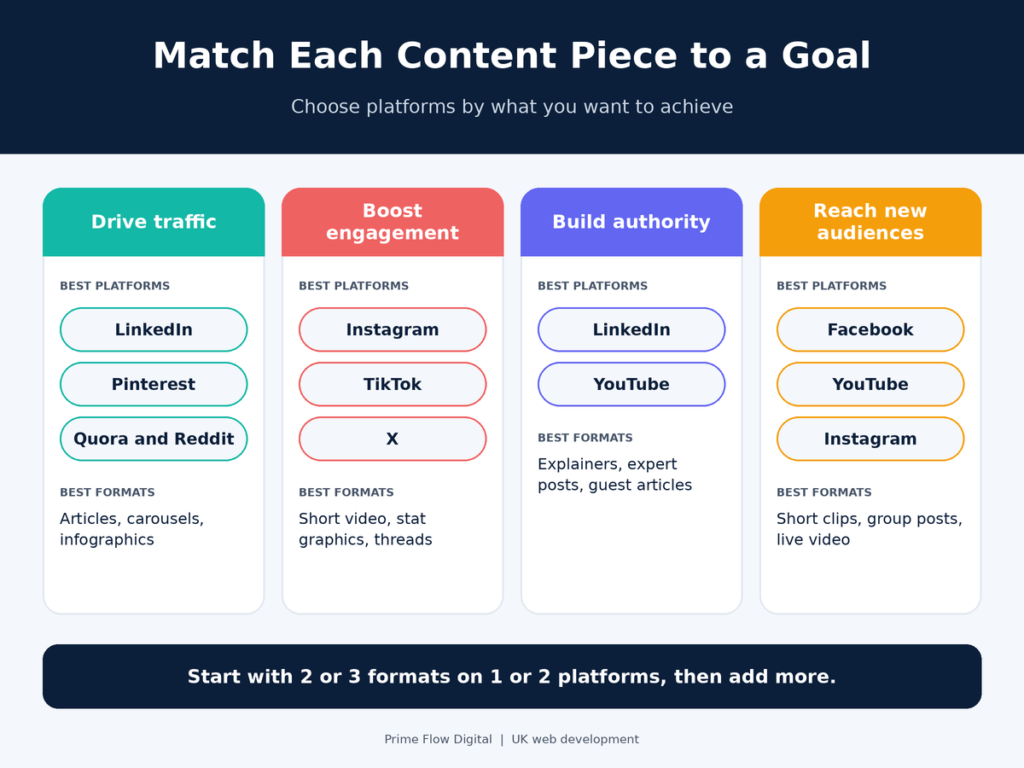
Step 4: Match Each Piece to a Goal and Platform
You do not need to be everywhere. Choose platforms based on what you want to achieve:
- Drive traffic to your website: LinkedIn, Pinterest and helpful community answers.
- Increase engagement: Instagram, TikTok and X.
- Build authority: LinkedIn and YouTube.
- Reach new audiences: Facebook, YouTube and Instagram.
For most UK small businesses, a good starting point is two or three formats on one or two platforms. A professional services firm might begin with LinkedIn posts, a carousel and an email. A local trades business might start with a short video, a Google Business Profile update and a Facebook post. Once the routine feels easy, add more.
Step 5: Build a Simple Repurposing Workflow and Calendar
Repurposing only works if it becomes a habit. The easiest way to make that happen is to plan the week in advance. Here is a simple schedule that suits a small team:
- Monday: Publish the blog post on your website and share it on your main social channel.
- Tuesday: Publish the LinkedIn text post and the FAQ updates.
- Wednesday: Send the first email and post the carousel.
- Thursday: Release the short video and share the infographic.
- Friday: Answer two or three community questions and schedule the following week’s pieces.
Space the pieces out rather than publishing everything at once. This keeps your content fresh, stops your audience feeling bombarded and gives each piece room to perform.
Tools that help. You do not need an expensive stack. A design tool such as Canva covers graphics and carousels. A scheduler such as Buffer or Later handles social posts. A tool like Descript or Loom helps with video and audio. AI assistants can create first drafts and summaries, but always edit them by hand so the final result is accurate and sounds like your business.
How to Avoid Duplicate and Thin Content
One common worry is that reusing content could harm your rankings. It will not, as long as you adapt rather than copy. Keep these points in mind:
- Rewrite for each format. A video script, an email and a LinkedIn post should each be written for their audience, not pasted from the original.
- Use canonical tags if the same article appears on more than one site. This tells search engines which version is the original.
- Add something new to every guest post or article. A different angle, a fresh example or extra data makes it valuable in its own right.
- Edit AI-assisted drafts. Add real experience, local knowledge and accurate detail, so the content is genuinely helpful and reflects your expertise.
How to Measure Results
If you cannot see what is working, you cannot improve it. Set up simple tracking from the start:
- Add UTM tags to every link that points back to your website. This lets Google Analytics show you which channels and formats send visitors.
- Match the metric to the goal. For awareness, look at impressions and views. For engagement, look at comments, shares and saves. For traffic, look at clicks and sessions. For results, look at email sign-ups, enquiries and sales.
- Review every quarter. Look at which formats and platforms performed best, double down on those, and refresh your best posts with new data and examples before you repurpose them again.
Common Mistakes to Avoid
- Publishing every piece on the same day
- Copying the same text word for word across platforms
- Ignoring the style and format of each platform
- Forgetting to link back to your website
- Trying to do all ten pieces at once instead of starting with two or three
- Never updating older posts before reusing them
Start Getting More From Every Post
You do not need to write more to get more from your content. You need to make the posts you already have work harder. Choose one strong blog post, prepare it so it can be split, create two or three new formats this week and track what happens. Once the routine is in place, scaling it up becomes much easier.
A website that is fast, well structured and built around your content makes the whole process simpler, because every piece you create has a clear place to send people. If you would like a website that supports your content strategy, or you want to know whether your current site is holding your blog back, Prime Flow Digital can help.
Frequently Asked Questions
What is content repurposing?
Content repurposing is the process of turning one piece of content, such as a blog post, into several new formats like videos, graphics, emails and social posts. You keep the core idea but adapt it to suit each platform and audience.
How many pieces of content can I get from one blog post?
Most guides suggest around ten, and a well-structured post can produce more. The exact number depends on how long the post is, how many sections it has and which formats suit your audience.
Does repurposing content help SEO?
It can. Covering a topic in several formats helps you build topical authority, creates more ways for people to find you and can earn links and mentions. The content still needs to be helpful and original in each format.
What is the difference between repurposing and cross-posting?
Cross-posting shares identical content on different channels. Repurposing rebuilds the content so that it suits each channel, for example turning a how-to article into a carousel, a video and an email series.
Which blog posts are best to repurpose?
Choose posts that already perform well, stay relevant over time and have a clear structure. Guides, how-tos, comparisons and posts with useful data are usually the best candidates.
How often should I repurpose content?
Make it part of your normal publishing routine, so every new post is planned with repurposing in mind. Review your best older posts about once a quarter, update them and repurpose them again.
Which tools help with content repurposing?
Canva is useful for graphics and carousels, Descript and Loom for video and audio, and Buffer or Later for scheduling. AI assistants can help with first drafts, but a person should always review the final content.
Do I need a website built for content repurposing?
You do not need a special website, but a fast, well-structured one helps. Clear headings, an FAQ section, share images, email sign-up forms and good page speed all make your content easier to find, share and convert.